How do I change a candidate’s contact and/or login information?
To edit a candidate’s contact or login information on your Talogy True Talent account, follow the instructions below.
You can also view this helpful VIDEO on how to edit candidate and administrator information.
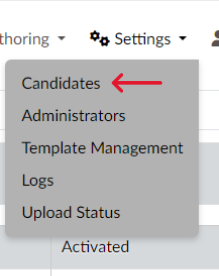
- Click “Candidates” under the “Settings” tab (3 wheels). (Screen 1)
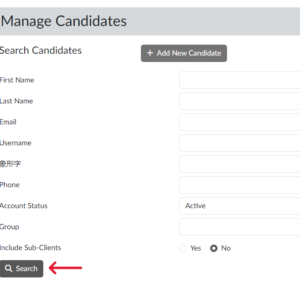
- Provide sufficient information to search for the candidate. (Screen 2)
- Scroll down to see the search results. Click the “Name” of the candidate whose information you want to modify. (Screen 3)
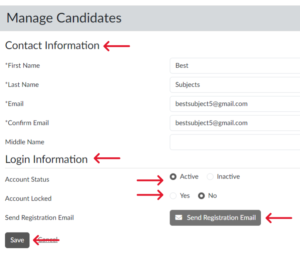
- From the next screen, you can: (Screen 4)
- Edit the candidate’s “Contact Information”
- Edit the “Login Information”
- Change the “Account Status”
- Change the “Login ID”
- Lock or Unlock the candidate’s account
- View the “Account Notes”
- Send a “Registration Email” to the candidate
- After all changes have been made, click “Save” (Screen 4)